






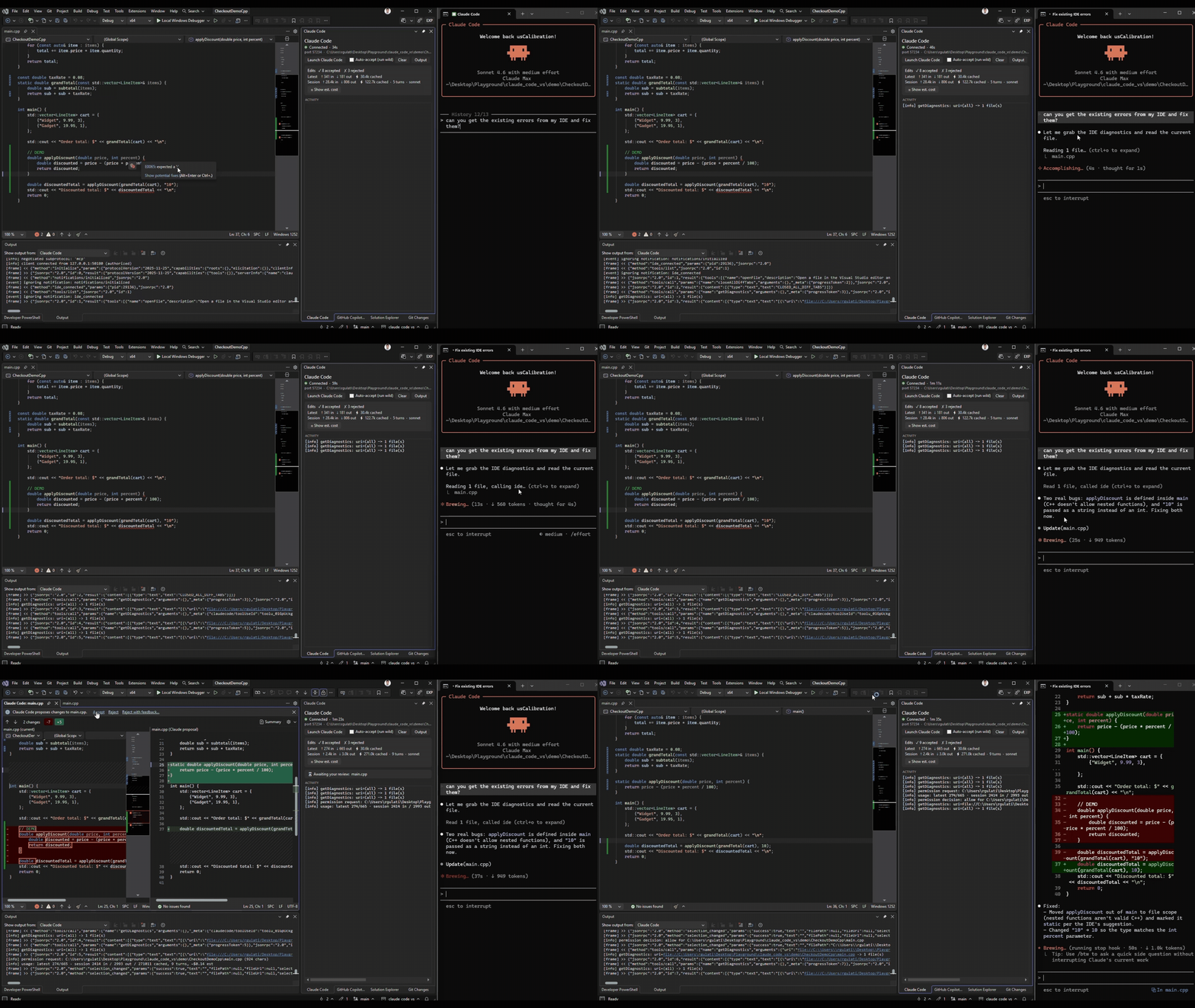
Bring Claude Code into Visual Studio 2026 – a native diff window with accept/reject, automatic selection + compiler-diagnostics context, and a live stats panel. The
claudeCLI does the agent work; this extension is the IDE half of Claude Code’s integration protocol.
Status: community project, not affiliated with Anthropic. Visual Studio 2026 only, for now.
Claude Code has first-class IDE integration for VS Code and JetBrains, but not Visual Studio – see anthropics/claude-code#15942. This extension implements that same IDE-integration protocol natively for VS, so the CLI drives a real Visual Studio diff window and sees your selection and build errors – instead of you copy-pasting into a terminal.
- Native diff with a single accept/reject gate – Claude’s edits open in Visual Studio’s diff viewer, and approving there is the only step (no duplicate y/n prompt in the terminal).
- Reject with feedback – reject an edit and tell Claude what to change; it reconsiders with your note.
- Run wild (auto-accept) – a panel toggle to apply edits without opening the diff, for when you want to let it cook. Resets each session.
- Diagnostics sharing – Claude reads Visual Studio’s compiler errors/warnings (C# and C++) and fixes them.
- Selection context – Claude automatically knows the file and lines you’re looking at.
- Live panel – a dockable Claude Code panel: connection status, edit decisions, and token usage + estimated cost (latest call vs cumulative session).
- Visual Studio 2026.
- The Claude Code CLI, installed and authenticated – see the Claude Code docs. This extension makes no model calls and does no agent work itself; it requires the CLI.
- Tested against
claude2.1.173.
- Marketplace: search “Claude Code for Visual Studio” in Extensions -> Manage Extensions, or install from the Visual Studio Marketplace.
- Sideload: download the
.vsixfrom Releases and double-click it.
- Open your project or solution in Visual Studio 2026.
- Open the Claude Code panel (View -> Other Windows -> Claude Code) and click Launch Claude Code (also available on the Tools menu).
- A terminal opens running
claude, already connected to the IDE (no/ideneeded). The panel pill turns green – Connected. - Ask Claude to make a change. Its edit opens as a diff – click Accept, Reject, or Reject with feedback….
Diagnostics need a loaded project (not a loose file in Open-Folder mode) for the compiler to analyze it.
This is a protocol bridge, not a re-implementation of the agent. On launch the extension:
- Starts a localhost WebSocket server and writes a lockfile at
~/.claude/ide/..lock - Launches
claudewithENABLE_IDE_INTEGRATIONand the bridge port, so it auto-connects and speaks MCP / JSON-RPC over the socket. - Implements the IDE tools the CLI drives –
openDiff,openFile,getDiagnostics, selection updates, and diff-tab lifecycle.
To make the VS diff the single approval gate, the extension installs a small PreToolUse hook into your workspace’s .claude/settings.json that routes proposed edits through the diff. The CLI does all agent work; the extension never makes model calls.
- The bridge binds to 127.0.0.1 only and validates an auth token (from the lockfile) on every connection. The token is never logged.
- The extension makes no network calls and no LLM calls of its own. All AI work is the
claudeCLI, under your own authentication. - On Launch, it writes these into your workspace’s
.claude/folder and merges hook entries into.claude/settings.json(preserving existing content):vs-permission-hook.ps1– routes Edit/Write/MultiEdit edits through the VS diff.vs-usage-hook.ps1– reports the transcript path so the panel can show token stats.
- Token cost is an estimate (hardcoded per-tier prices), shown only when you click Show est. cost.
- Visual Studio 2026 only for now (a VS 2022 backfill is planned if there’s demand).
- The IDE-integration protocol is undocumented and version-fragile – a
claudeupdate could change it. Known-good: 2.1.173. - Diagnostics need a loaded project (the Error List / Roslyn won’t analyze loose files).
- Token stats refresh on edits (the reliable hook trigger), so a chat-only turn may not update them immediately.
- Cost figures are estimates, not billing.
- Panel says “Waiting for CLI”: click Launch Claude Code, or run
/idein aclaudeterminal and pick Visual Studio. - New files land in the wrong folder: launch from the extension (it pins the working directory to your workspace), or run
claudefrom inside the repo. - getDiagnostics returns nothing: open the code as a project and confirm the error appears in the Error List.
- Filing a bug: include the Output -> Claude Code pane contents and your
claude --version.
Requires Visual Studio 2026 with the Visual Studio extension development workload.
msbuild src/ClaudeCodeVS/ClaudeCodeVS.csproj /t:Rebuild /p:Configuration=Release
Press F5 (or launch devenv /rootsuffix Exp) to debug in the experimental instance. Architecture and contributor guidance live in CLAUDE.md. Future work lives in ROADMAP.md.
Issues and PRs welcome. The protocol contract is undocumented and has regressed before – if you bump the claude CLI, please run the spike smoke test (spike/) and note the version.
MIT © 2026 Rishi Gulati. Not affiliated with Anthropic. “Claude” and “Claude Code” are trademarks of Anthropic, used here only to describe interoperability.



Add Comment